
Burn folders and files directly from Windows Explorer
If you only burn a CD from time to time, there's no need to install a mammoth recording suite; Explore&Burn may be more than enough.
Explore&Burn is not a standalone burning app, but rather an add-on that's seamlessly integrated into Windows Explorer and lets you burn folders and files to CD or DVD directly from their context menu.
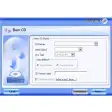
Simply right click on any item you want to record to CD and select "Burn to disc…". You'll be presented with a step-by-step wizard that will guide you through the recording process.
Being a simple burning add-on, Explore&Burn doesn't have any special options, except for a few features such as support for finalizing sessions and the ability to burn double-layered DVDs and also ISO files. Bear in mind that if you're using Windows XP, you'll need to install the IMAPI hotfix from Microsoft.
Explore&Burn is a simple add-on that lets you record CD and DVD from Windows Explorer context menu.
Burn DVD-Video discs using the files in a prepared VIDEO_TS folder;Automatically checks for updates;Supports verification of the data written on disc after a burn;Burning wizards have Aero look and feel in Windows Vista and later;An extension for the disc recorder property sheet which allows you to view information about the currently mounted disc (number of sessions, file system, list of tracks etc). Just click "Properties" in the drive context menu and choose the "Disc" tab;Multi-session support for DVD-RW and DVD+RW (in Windows 7 only);Burn-On-The-Fly support (in Windows 7 only);Supports burning of multiple disc copies.
Changes
Burn DVD-Video discs using the files in a prepared VIDEO_TS folder;Automatically checks for updates;Supports verification of the data written on disc after a burn;Burning wizards have Aero look and feel in Windows Vista and later;An extension for the disc recorder property sheet which allows you to view information about the currently mounted disc (number of sessions, file system, list of tracks etc). Just click "Properties" in the drive context menu and choose the "Disc" tab;Multi-session support for DVD-RW and DVD+RW (in Windows 7 only);Burn-On-The-Fly support (in Windows 7 only);Supports burning of multiple disc copies.
























User reviews about Explore&Burn
Have you tried Explore&Burn? Be the first to leave your opinion!